
Description
Automarticles is a content generation and management platform for blogs. This plugin connects your WordPress site to your Automarticles account, so posts generated and scheduled on the platform are published automatically on your blog, with no manual copy-pasting required.
What the plugin does:
- Receives and creates published/scheduled/draft posts coming from Automarticles, with title, content, description, featured image and category.
- Updates an existing post when it is edited on Automarticles (content, image, status, category).
- Removes a post when it is deleted on Automarticles.
- Creates, updates and organizes categories automatically, avoiding duplicates when the category already exists on your blog.
- Returns the final published post URL back to Automarticles, enabling automatic sharing on social networks.
- Shares your blog’s category list with Automarticles, so you can link existing categories instead of creating new ones.
How it works:
Communication happens through a token-authenticated webhook: Automarticles sends events (post and category creation/update/deletion) directly to your WordPress site, which processes them and responds. No continuous read access to your blog or installation of external services is required — everything happens inside WordPress itself.
External services
This plugin connects your WordPress site to the Automarticles platform (https://automarticles.com), a content generation and management platform for blogs, so posts and categories created there can be published on your blog automatically.
It downloads the featured image of a post from the URL included in the webhook payload your own Automarticles account sends to your site, using wp_remote_get(), so the image can be attached to the WordPress post as its featured image. This only happens when Automarticles sends a POST_CREATED or POST_UPDATED event that includes a featured image; no other browsing or periodic data is sent to or fetched from Automarticles.
This service is provided by Automarticles: Terms of Service and Privacy Policy.
Screenshots
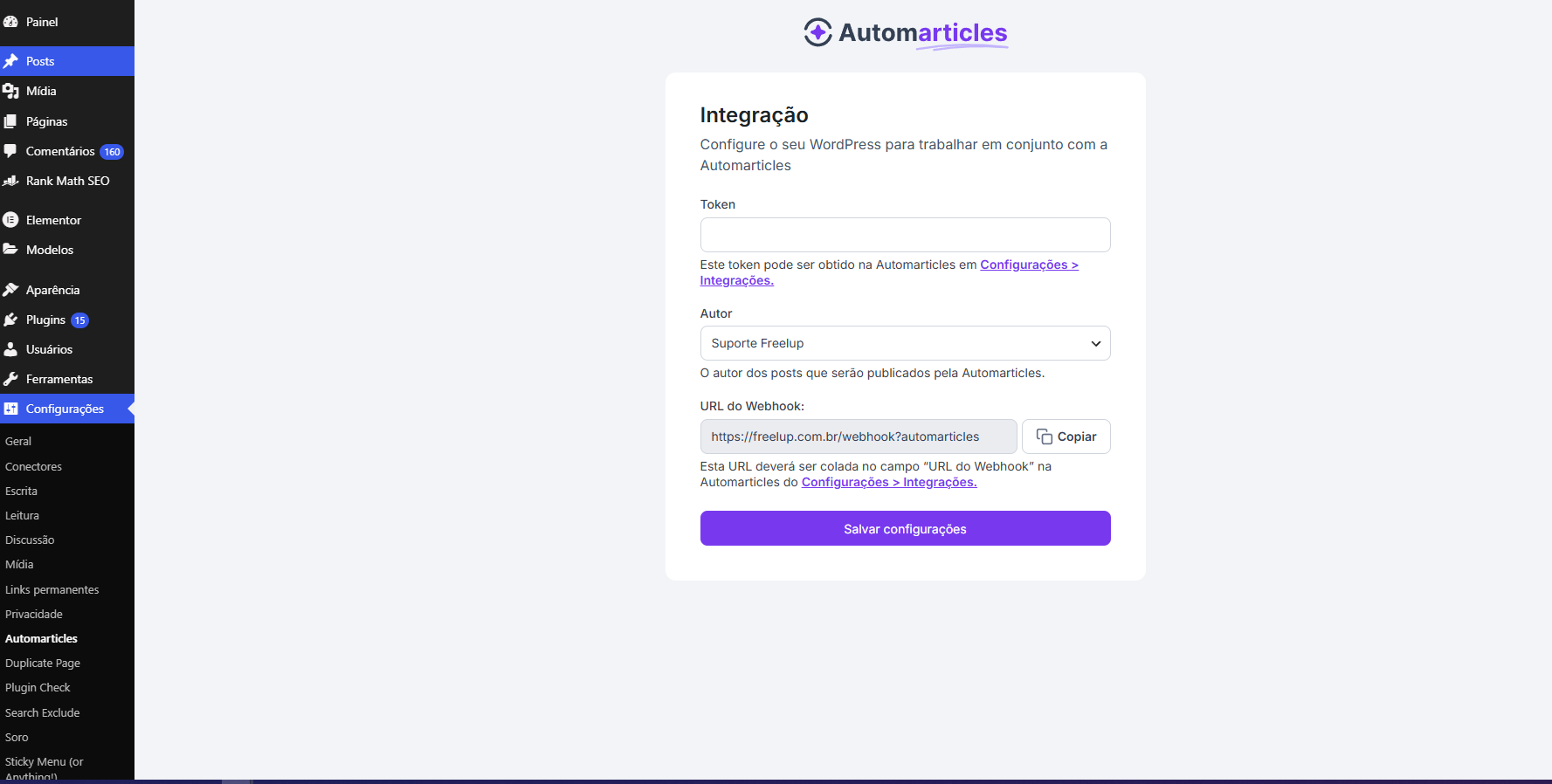
Installation
- Upload the plugin
.zipfile under Plugins > Add New > Upload Plugin, or install it directly from the WordPress plugin search by looking for “Automarticles”. - Activate the plugin under Plugins > Installed Plugins.
- In the WordPress admin menu, go to Settings > Automarticles.
- Copy the Token generated in your Automarticles account (under Settings > Integrations) and paste it into the “Token” field on this screen.
- Copy the Webhook URL shown on this screen and paste it into the matching field in Automarticles.
- Choose the default Author who will be credited on posts published by the plugin (optional).
- Click Save Settings.
- Go back to Automarticles and click Verify Integration.
That’s it — from then on, posts published/scheduled on Automarticles are automatically sent to your WordPress site.
FAQ
-
Do I need to configure any webhook manually?
-
No. The plugin automatically exposes the required endpoint after activation — just paste the URL shown on the plugin’s settings screen into your Automarticles account.
-
Does the plugin access my blog continuously?
-
No. The plugin makes no periodic outbound calls. It only receives and responds to events sent by Automarticles (webhook model), authenticated by a token you control.
-
What happens if I already have categories created on my blog?
-
You can sync your existing categories with your Automarticles account before publishing, avoiding duplicate categories. This link is always created manually, with your confirmation.
-
Does the plugin work with any theme?
-
Yes. The plugin works at the content layer (native WordPress posts and categories) and does not depend on any specific theme.
-
Where do I find the Token and integration URL for Automarticles?
-
Inside your Automarticles account, under Settings > Integrations > WordPress.
Reviews
There are no reviews for this plugin.
Contributors & Developers
“Automarticles Sync” is open source software. The following people have contributed to this plugin.
Contributors
Translate “Automarticles Sync” into your language.
Interested in development?
Browse the code, check out the SVN repository, or subscribe to the development log by RSS.
Changelog
1.6.10
- Fixed: publishing a post with a featured image could crash with a fatal PHP error (“Call to undefined function wp_tempnam()”) on every request, because that WordPress core function wasn’t loaded in the webhook’s execution context. This was the root cause of posts silently failing to publish since image processing was introduced. Found and confirmed via the
GET_LAST_ERRORdiagnostic added in 1.6.8/1.6.9.
1.6.9
- Improved:
GET_LAST_ERRORnow returns the 10 most recent recorded errors (fatal PHP errors or image-processing failures), not just the last one, and each entry identifies which post it came from (Automarticles post id, slug, title). Detection of PHP fatals also now covers the entire event, not only image processing.
1.6.8
- Added: a new
GET_LAST_ERRORwebhook event (authenticated with the same token as everything else) that returns the last recorded fatal PHP error or image-processing failure, so it can be checked remotely without enablingWP_DEBUGor accessing the server. The error is now always recorded (not only whenWP_DEBUGis on).
1.6.7
- Fixed: garbled (mojibake) text in a few error messages (“category information not provided”, “invalid category name or id”) caused by a file encoding issue. Cosmetic only, no functional change.
1.6.6
- Fixed: featured-image processing during publish is now faster and lighter, staying within the plugin-to-Automarticles response window on slower/shared hosts. The image is resized to a smaller max width (1600px, down from 2000px) with a slightly lower JPEG quality, and only the thumbnail/medium sizes are generated synchronously for that attachment (custom theme sizes still generate normally for every other upload on the site).
- Hardened: requests extra memory from WordPress before decoding a large image, avoiding a silent PHP fatal error (out of memory) on hosts with a tight memory limit.
- Added: logs the underlying PHP fatal error (when
WP_DEBUGis on) if publishing a post crashes the request, instead of failing with no diagnostic trail.
1.6.5
- Fixed: large featured images (especially PNG) could make the site time out and return a 503 error when publishing, because generating all registered thumbnail sizes from a big, uncompressed image took longer than the server’s PHP execution limit. Featured images are now resized (max width 2000px) and recompressed to JPEG right after download, before thumbnails are generated, which drastically cuts processing time regardless of the original format/size. Falls back to the original file untouched if the server can’t process images (no GD/Imagick).
- Hardened: raised the featured-image download timeout (15s to 20s) and requests a longer PHP execution time budget for that step, when the host allows it.
1.6.4
- Fixed: settings-page CSS/JS are now loaded via
wp_enqueue_style()/wp_enqueue_script()instead of inline<style>/<script>tags. - Fixed: renamed the
token_automarticlesandautor_automarticlesoptions toautomarticles_tokenandautomarticles_autor, so stored option names are properly prefixed. - Added:
== External services ==section documenting the featured-image download from Automarticles.
1.6.3
- Removed debug
error_log()calls from the image download routine entirely, instead of just gating them behindWP_DEBUG.
1.6.2
- Fixed:
date()calls replaced withgmdate()for deterministic, timezone-independent date handling. - Fixed: settings form nonce is now verified before any
$_POSTdata is read. - Fixed: webhook token header is now sanitized and unslashed before use.
- Fixed: debug
error_log()calls are now gated behindWP_DEBUG, so they no longer run by default in production.
1.6.1
- Security: added a nonce (CSRF protection) to the settings form.
- Security: added output escaping (esc_attr/esc_html/esc_url) to all fields on the settings screen.
- Security: all plugin functions now use the
automarticles_prefix, avoiding name collisions with other plugins. - Added protection against direct access to the plugin file.
1.6.0
- Category resolution now automatically recognizes a category already linked by Automarticles (via the native WordPress ID), instead of relying only on metadata or name.
1.5.0
- New GET_CATEGORIES event: Automarticles can now read the list of categories that already exist on your WordPress site.
- POST_CREATED and POST_UPDATED now return the published post’s public URL.
1.4.1
- Previous version, with support for creating/updating/deleting posts and categories via webhook.