Title: Factorial2000 Catalog Sync for Prom.ua
Author: kmax
Published: July 11, 2026
Last modified: August 8, 2026
---
Search plugins
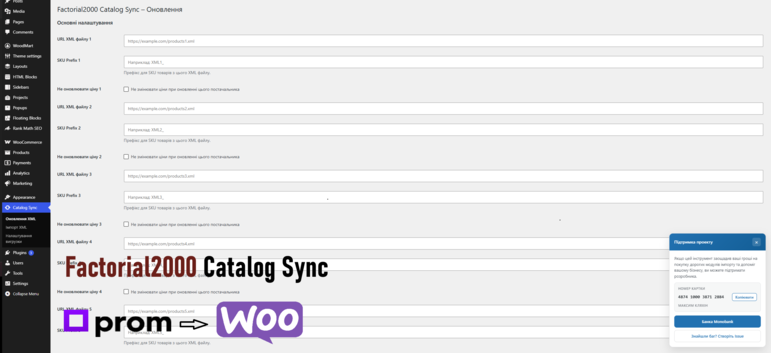

# Factorial2000 Catalog Sync for Prom.ua
By [kmax](https://profiles.wordpress.org/factorial2000/)
[Download](https://downloads.wordpress.org/plugin/factorial2000-catalog-sync.0.6.5.zip)
* [Details](https://tzm.wordpress.org/plugins/factorial2000-catalog-sync/#description)
* [Reviews](https://tzm.wordpress.org/plugins/factorial2000-catalog-sync/#reviews)
* [Installation](https://tzm.wordpress.org/plugins/factorial2000-catalog-sync/#installation)
* [Development](https://tzm.wordpress.org/plugins/factorial2000-catalog-sync/#developers)
[Support](https://wordpress.org/support/plugin/factorial2000-catalog-sync/)
## Description
This plugin connects your WooCommerce store with supplier XML feeds for automatic
catalog synchronization.
**Standout feature:** The XML Editor (Pro) lets you visually build a custom Prom.
ua export — pick categories and products, apply price/stock filters, and generate
a ready-to-upload XML in seconds.
**Key features:**
* Free forever plan + **14-day Pro trial with no credit card** (full Pro features
during the trial)
* Import simple and variable products from XML — names, descriptions, images (picture),
attributes (param), categories, weight, barcode, dimensions
* Automatic stock status and price sync via WP-Cron with configurable intervals(
every 5/10/15/30 minutes, hourly, twice daily, daily)
* Multiple supplier slots with individual SKU prefixes, price adjustments (margin/
markup/fixed, Pro), skip-price and quantity-update options
* Telegram notifications with sync reports
* XML export: filter to keep only new products, or use the visual XML editor to
build a custom feed by category/product (Pro) — **key differentiator** for marketplace
sellers
* Fields updater (Pro): update selected fields (name, description, images, attributes,
categories, tags, vendorCode) on already-imported products
* Image processing (Pro): convert PNGWebP/JPG, optimize, resize on import
* Currency conversion via XML currencies/currencyId
* Built-in documentation page with sticky sidebar navigation
* Clean uninstall removes plugin settings, transients, and cron jobs
* Automated test suite: 200+ PHPUnit unit tests (offline stubs, no WordPress/WooCommerce
required to run) covering XML parse/import modes, stock sync, fields update,
export filter/editor, licensing, and admin AJAX security gates
**Requirements:**
* WordPress 5.8 or higher
* WooCommerce 3.0 or higher
* PHP 7.4 or higher with XML, SimpleXML, and cURL extensions
**Video setup guide:** [YouTube tutorial](https://www.youtube.com/watch?v=tdrMy7cAWEk)
### External services
This plugin connects to external services. Both are optional and are only used when
you configure them.
**Supplier XML feeds (e.g. Prom.ua)**
When you enter an XML feed URL in the settings, the plugin downloads that file during
the initial import and during scheduled stock/price updates. Only a request to the
URL you provide is made and no personal data is sent. The feed itself is provided
by your supplier (for example Prom.ua); please refer to that provider’s own terms
and privacy policy.
**Telegram Bot API**
If you enter a Telegram bot token and one or more chat IDs in the settings, the
plugin sends notification messages to the Telegram Bot API (https://api.telegram.
org) after an import or a stock/price update completes. The data sent includes your
bot token, the target chat ID(s) and the text of the sync report (for example counts
of updated or missing products). Requests are made only when Telegram notifications
are configured and an update runs.
This service is provided by Telegram. By enabling notifications you agree to Telegram’s
Terms of Service (https://telegram.org/tos) and Privacy Policy (https://telegram.
org/privacy).
## Screenshots
[⌊Stock update settings with XML URLs, cron interval, and Telegram options.⌉⌊Stock
update settings with XML URLs, cron interval, and Telegram options.⌉[
Stock update settings with XML URLs, cron interval, and Telegram options.
[⌊XML import page with simple and variable product modes.⌉⌊XML import page with
simple and variable product modes.⌉[
XML import page with simple and variable product modes.
[⌊Variable product group analysis with attribute selection.⌉⌊Variable product group
analysis with attribute selection.⌉[
Variable product group analysis with attribute selection.
## Installation
1. Upload the plugin files to the `/wp-content/plugins/factorial2000-catalog-sync`
directory, or install the plugin through the WordPress plugins screen.
2. Activate the plugin through the **Plugins** screen in WordPress.
3. Make sure WooCommerce is installed and active.
4. Open **Синхронізація каталогу Оновлення XML** in the admin menu.
5. Add your supplier XML URL, SKU prefix (e.g. `SUP_`), and choose the update interval.
6. Go to **Імпорт XML** for the initial product import from your XML file.
7. Optionally configure Telegram notifications and cron interval on the **Оновлення
XML** page.
8. Refer to the **Документація** tab for full usage details.
## FAQ
### Does this plugin require WooCommerce?
Yes. This plugin is built specifically for WooCommerce product import and synchronization.
### Which XML format is supported?
The plugin supports YML format used by Prom.ua and many Ukrainian suppliers. Both
simple `` and variable products (with `group_id`) are supported. See the
built-in Documentation page for the full field reference.
### Can I connect multiple suppliers?
Yes. The plugin supports multiple supplier slots, each with its own XML URL, SKU
prefix, price adjustment rules, and options to skip price updates or sync stock
quantities. Pro and the free 14-day trial (no credit card) unlock additional slots
and more frequent cron intervals.
### Is there a free Pro trial?
Yes. You can start a **14-day Pro trial without entering a credit card**. During
the trial you get the same features as Pro. After it ends, the Free plan limits
apply again unless you upgrade.
### What happens to products missing from the XML feed?
During scheduled stock updates, if a SKU prefix is configured, the plugin detects
products in WooCommerce with that prefix that are no longer present in the XML.
Simple products are moved to “Draft”. Variations are marked “Out of stock” (variable
parent products are not drafted). If no SKU prefix is set, this check is skipped.
Ensure your XML feed always contains the full catalog — a truncated feed can hide
many simple products.
### Does it work on shared hosting?
Yes. The plugin uses XMLReader streaming for efficient parsing and supports both
background (WP-Cron) and synchronous update modes. For large catalogs, use the background
mode. The import processes products one at a time via AJAX, which works well on
most shared hosts for catalogs up to a few thousand products.
### Where can I report bugs or request features?
Please use the support tab on WordPress.org.
## Reviews
There are no reviews for this plugin.
## Contributors & Developers
“Factorial2000 Catalog Sync for Prom.ua” is open source software. The following
people have contributed to this plugin.
Contributors
* [ kmax ](https://profiles.wordpress.org/factorial2000/)
[Translate “Factorial2000 Catalog Sync for Prom.ua” into your language.](https://translate.wordpress.org/projects/wp-plugins/factorial2000-catalog-sync)
### Interested in development?
[Browse the code](https://plugins.trac.wordpress.org/browser/factorial2000-catalog-sync/),
check out the [SVN repository](https://plugins.svn.wordpress.org/factorial2000-catalog-sync/),
or subscribe to the [development log](https://plugins.trac.wordpress.org/log/factorial2000-catalog-sync/)
by [RSS](https://plugins.trac.wordpress.org/log/factorial2000-catalog-sync/?limit=100&mode=stop_on_copy&format=rss).
## Changelog
#### 0.6.3
* Fixed: Freemius plugin-scope API paths (avoid duplicated /plugins/{id}/ prefix).
#### 0.6.2
* Fixed: Freemius deploy uses plugin-scope API keys (Product Settings Keys).
#### 0.6.1
* Fixed: Freemius GitHub deploy now fails loudly on API errors (custom deploy script).
#### 0.6.0
* Added: Freemius freemium packaging with GitHub Actions deploy on `v*` tags.
* Fixed: removed `uninstall.php` — cleanup runs on Freemius `after_uninstall`.
* Improved: import progress UI and admin assets cache-busting.
#### 0.5.9
* Fixed: removed `uninstall.php` for Freemius deployment — cleanup now runs on
Freemius `after_uninstall`.
#### 0.5.8
* Fixed: import progress panel styles now load after CSS updates (asset version
bump + reliable show/hide without stale browser cache).
* Improved: progress panel visibility is driven by `.is-active` and fully clears
the HTML `hidden` attribute.
#### 0.5.7
* Fixed: XML export filter now reads the SKU prefix from the correct slot-1 option(`
f2000cs_sku_prefix_1`) instead of the legacy key.
* Fixed: XML Editor and export filter parse XML elements and attributes case-insensitively(`
categoryId`/`CATEGORYID`/`parentID` etc.).
* Fixed: numeric XML category/offer IDs round-trip as strings so the JS tree and
product selection work correctly.
* Fixed: export page shows the correct product count and pre-fills the right prefix.
* Fixed: `` now correctly handles values `1`, `yes`, `y`, `True`,`
TRUE` in addition to `true` (YML spec compliance).
* Fixed: `` and `` are now parsed — offer prices are converted
using the currency rate when the offer currency differs from the store’s default.
* Fixed: `` with European comma-as-decimal formatting (e.g. “1.999,00”)
is now parsed correctly.
* Fixed: multiple `` elements per offer are now supported (comma-joined).
* Fixed: `` elements with the same `name` are now concatenated with “; ”
instead of overwriting.
* Fixed: `` is now appended to the attribute value (e.g. “5 кг”).
* Fixed: `download_url()` calls now disable SSL verification, allowing image downloads
from servers with self-signed certificates.
* Fixed: `wc_product_meta_lookup` price columns are now synced after stock update
price changes (HPOS compatibility).
* Added: ``, ``, `` are now imported as product meta(`
_weight`, `_barcode`, `_dimensions`).
* Added: cron intervals `10_minute`, `15_minute`, `30_minute` for finer scheduling
granularity (Pro).
* Added: Documentation admin page with sticky sidebar navigation covering the full
plugin functionality.
* Added: unit test harness with WP-function stubs (200+ tests, runs offline without
WordPress/WooCommerce).
* Added: Gulp build system — interactive menu, SVN-ready release packaging, version
bumping across all files, phpcs/phpunit runs.
* Added: PHPCS ruleset (WordPress standard) with project-specific cosmetic-sniff
disables.
#### 0.5
* Added: **XML Editor** — build a filtered export by selecting categories and/or
individual offers, with conditions (only in stock, min/max price, keep oldprice)
and live product thumbnails. Accessible from **Налаштування вигрузки**.
* Added: **Image processing (Pro)** — convert PNG to WebP/JPG, optimize, and resize
product images on import.
* Added: **Fields Updater** — update selected fields (name, description, price,
images, etc.) of products that are already on the site, matched by SKU.
* Added: case-insensitive parsing of XML feeds that use non-standard element casing.
* Added: modular admin pages split from the monolithic settings page.
* Improved: admin UI with collapsible category tree, search, and clearer supplier
management.
* Improved: background sync event handling and transient cleanup.
#### 0.4
* Replaced the simple per-supplier margin (%) field with a price adjustment switcher:
choose between Маржа (margin, always added, 0-99%), Націнка (markup %, can be
added or subtracted) or Фіксована сума (a flat currency amount, can be added
or subtracted). Available when price updates are allowed for that supplier.
#### 0.3
* First release on WordPress.org.
* Renamed functions, options, hooks, and assets to the f2000cs_ prefix for consistency.
* Bumped version and aligned plugin branding for the directory listing.
#### 0.2
* Prepared the plugin for the WordPress.org directory: code now follows WordPress
coding and security standards.
* Security: added nonce verification, capability checks, input sanitization and
output escaping across all admin actions.
* All remote requests now use the WordPress HTTP API (wp_remote_get/wp_remote_post)
instead of cURL and file_get_contents.
* Added a unique prefix and namespace to all functions, classes, options, hooks
and meta keys to avoid conflicts with other plugins.
* Added a “Telegram notifications” setup guide and clearer field hints (how to
get the bot token and chat ID).
* Documented external services (Telegram Bot API and supplier XML feeds) in the
readme.
* Renamed the plugin to “Factorial2000 Catalog Sync for Prom.ua and WooCommerce”
and changed the admin menu label to “Catalog Sync”.
* Added a WooCommerce activation check with an admin notice when WooCommerce is
missing.
#### 0.1
* Initial version: import of simple and variable products from Prom.ua XML, scheduled
stock/price updates, XML export filter and Telegram notifications.
## Meta
* Version **0.6.5**
* Last updated **5 days ago**
* Active installations **Fewer than 10**
* WordPress version ** 5.8 or higher **
* Tested up to **7.0.4**
* PHP version ** 7.4 or higher **
* Language
* [English (US)](https://wordpress.org/plugins/factorial2000-catalog-sync/)
* Tags
* [import](https://tzm.wordpress.org/plugins/tags/import/)[stock](https://tzm.wordpress.org/plugins/tags/stock/)
[woocommerce](https://tzm.wordpress.org/plugins/tags/woocommerce/)[xml](https://tzm.wordpress.org/plugins/tags/xml/)
* [Advanced View](https://tzm.wordpress.org/plugins/factorial2000-catalog-sync/advanced/)
## Ratings
No reviews have been submitted yet.
[Your review](https://wordpress.org/support/plugin/factorial2000-catalog-sync/reviews/#new-post)
[See all reviews](https://wordpress.org/support/plugin/factorial2000-catalog-sync/reviews/)
## Contributors
* [ kmax ](https://profiles.wordpress.org/factorial2000/)
## Support
Got something to say? Need help?
[View support forum](https://wordpress.org/support/plugin/factorial2000-catalog-sync/)
## Donate
Would you like to support the advancement of this plugin?
[ Donate to this plugin ](https://send.monobank.ua/jar/8CiFBAfJKK)